If you have purchased an ALIBARBAR TEQ 12000, it is worth checking the product information on the original packaging before putting the box away.
The back of the original TEQ 12000 box includes product identification and authentication information, including a QR code that can be scanned to check product authenticity.
In this guide, we explain where to find the authentication QR code, how to scan it using your phone, how it differs from the printed barcode and what to do if the verification page does not load.
Product packaging contains useful information that helps identify the exact model and flavour you have purchased.
For the ALIBARBAR TEQ 12000, the original box includes product identification and authentication information on the back. This gives you a reference point when checking the product.
Before scanning anything, it is worth checking a few basic details:
These checks help identify the product, but packaging appearance alone should not be treated as proof of authenticity. The authentication information is an important part of the checking process.
The authentication information is located on the back of the original ALIBARBAR TEQ 12000 packaging.
On the packaging version shown below, the lower section of the back panel contains several separate printed elements.
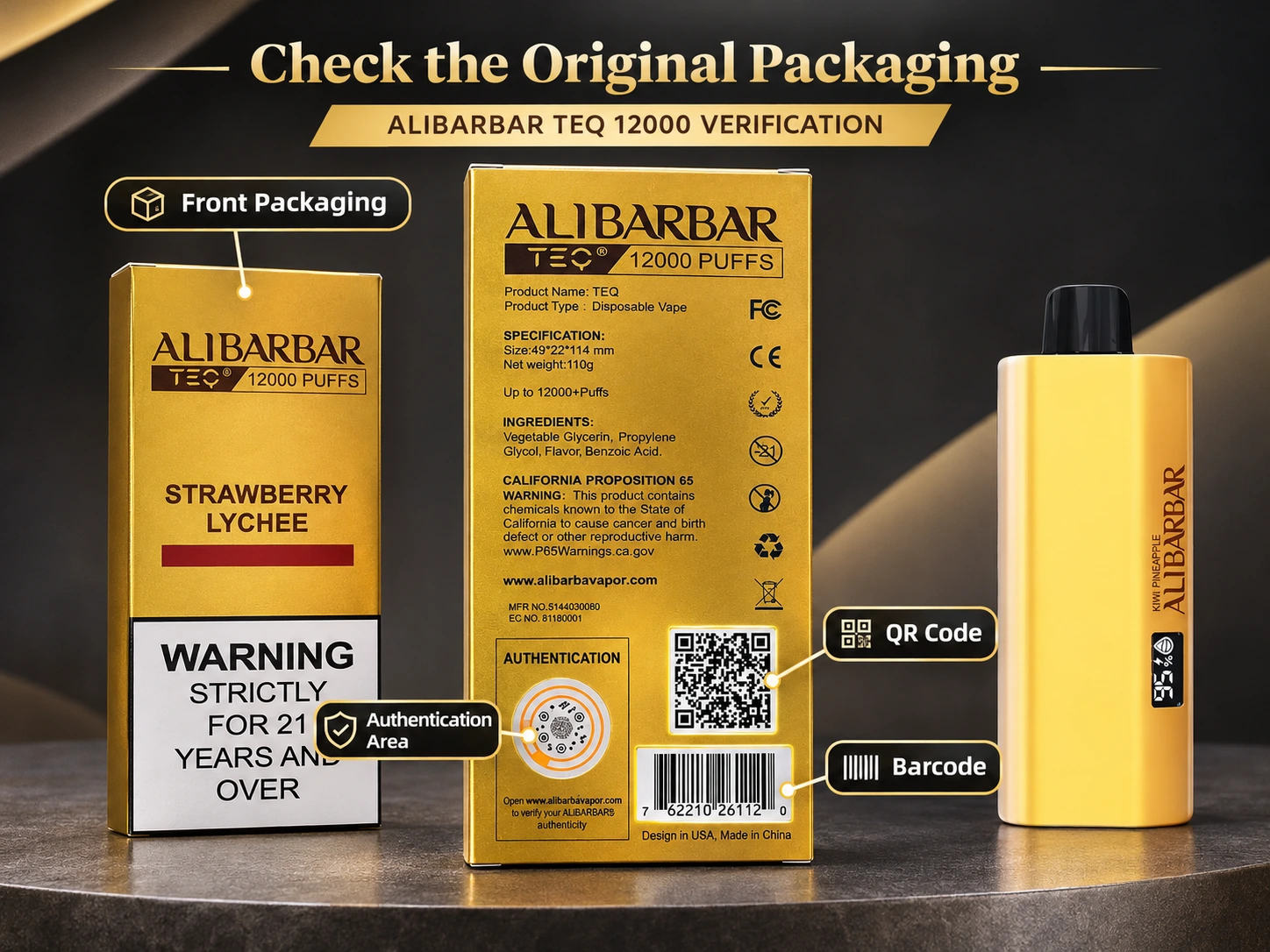
Look for the section labelled AUTHENTICATION. This is the dedicated area for checking the product's authenticity.
A square QR code is printed next to the authentication panel. This is the code you need to scan using your smartphone.
A separate linear barcode also appears below the QR code. It is different from the square QR code and should not be confused with it.
When checking product authenticity, make sure you scan the square QR code rather than the printed barcode.
Packaging artwork can vary between production batches, so always refer to the actual authentication markings on your own original box.
Checking your ALIBARBAR TEQ 12000 is straightforward. You only need the original packaging and a smartphone camera.
Always scan the QR code printed on your own original packaging rather than using a QR code from an online product image.
The back of the TEQ 12000 packaging contains both a QR code and a traditional barcode. Although they are both machine-readable codes, they are not interchangeable.
| Feature | QR Code | Barcode |
|---|---|---|
| Appearance | Square pattern | Linear black-and-white lines |
| Location | Next to the authentication panel | Printed below the QR code |
| Purpose | Used to access product verification information | Separate product identification code |
| Which one to scan? | Yes, for authentication | No, it is not a substitute for the QR code |
If your purpose is to check product authenticity, always start with the dedicated square QR code.
Sometimes a phone camera may have difficulty recognising a printed QR code. This does not automatically mean that the product is counterfeit or that the code is invalid.
Before reaching any conclusion, check the following:
Make sure the QR code is clearly visible. Poor lighting, reflections, a dirty camera lens or an unfocused image can make scanning difficult.
If you are trying to scan a screenshot or a product image, try using the QR code printed directly on your original packaging instead.
The original box is the preferred reference when checking the specific product you received.
After scanning the QR code, the verification page may require an internet connection to load. If the page does not open, check your connection and try again.
Make sure you have opened the page provided by the QR code. Follow the instructions displayed on the page and review the product information carefully.
Avoid entering personal or payment information on an unrelated or unfamiliar website.
If the QR code cannot be recognised or the verification information remains unclear, keep the original packaging and contact the retailer.
Providing the order number, clear photographs of the front and back of the box and a screenshot of any verification message will help the retailer review the issue.
Do not discard the packaging or attempt to modify the authentication section while the issue is being checked.
Not necessarily. A product's appearance, printed logo or packaging colour should not be used as the only way to determine whether it is genuine.
When checking an ALIBARBAR TEQ 12000, it is better to consider several details together:
Different product models can have similar design features, and packaging artwork may change between production versions. A visual difference alone should not be treated as a final authenticity judgement.
If something does not match, keep the packaging and ask the retailer to check it rather than making assumptions.
If you have difficulty verifying your ALIBARBAR TEQ 12000, a few clear details can make it easier for our team to review your enquiry.
When contacting us, please provide:
Please keep the original product and packaging until the enquiry has been reviewed.
You can reach our team through our Contact Us page.
The authentication QR code is printed on the back of the original TEQ 12000 packaging, next to the dedicated AUTHENTICATION panel.
Turn over the original packaging and locate the AUTHENTICATION section. Scan the QR code using your smartphone camera, open the verification page and follow the instructions displayed on your screen.
When checking a particular unit you have received, use the QR code printed directly on its original packaging. Do not rely on a QR code shown in an online product image.
No. The QR code is the square pattern used to access the verification information. The barcode is a separate linear code printed underneath it. Make sure you scan the square QR code.
Check the lighting, camera focus and internet connection first. Try scanning the original printed code again. If it still does not work, keep the packaging and contact the retailer with clear photographs and your order number.
No. A scanning problem alone is not enough to determine whether a product is genuine. Camera focus, lighting, internet access and webpage availability can all affect the process. Contact the retailer if the issue continues.
Yes. We recommend keeping the original box until you have completed the verification check. It also provides useful product and model information if you need assistance later.
No. The barcode is a separate printed identification element. Use the dedicated square authentication QR code and follow the instructions provided on the verification page.
Keep the original packaging and avoid making a final judgement based on one unexpected result. Take photographs of the box, device and verification information, then contact the retailer for assistance.
If you want to learn more about the product, its specifications and available options, visit our ALIBARBAR TEQ 12000 product page.
For a complete overview of the available options, you can also read our ALIBARBAR TEQ 12000 Complete Flavours Guide.
If you have questions about the battery and e-liquid indicators, our ALIBARBAR TEQ 12000 Screen Indicators Guide explains how to read the built-in display.
Checking the original packaging and following the QR code verification instructions are the best starting points when reviewing your ALIBARBAR TEQ 12000. If anything remains unclear, our team is available to help.


